
Connecting Stripe for Payments
How to connect your Stripe account so payments go directly to your bank.
Vastali uses Stripe Connect to route payments directly to your bank account. When a customer pays for a session, the funds are transferred directly to you — no manual payouts, no holding periods. On Foundation, Growth, and Enterprise plans there is no Vastali platform fee.
Before you start
- ✓You will need a Stripe account (free to create at stripe.com)
- ✓Stripe requires your business name, bank details, and personal identity verification
- ✓The connection process takes around 5 minutes
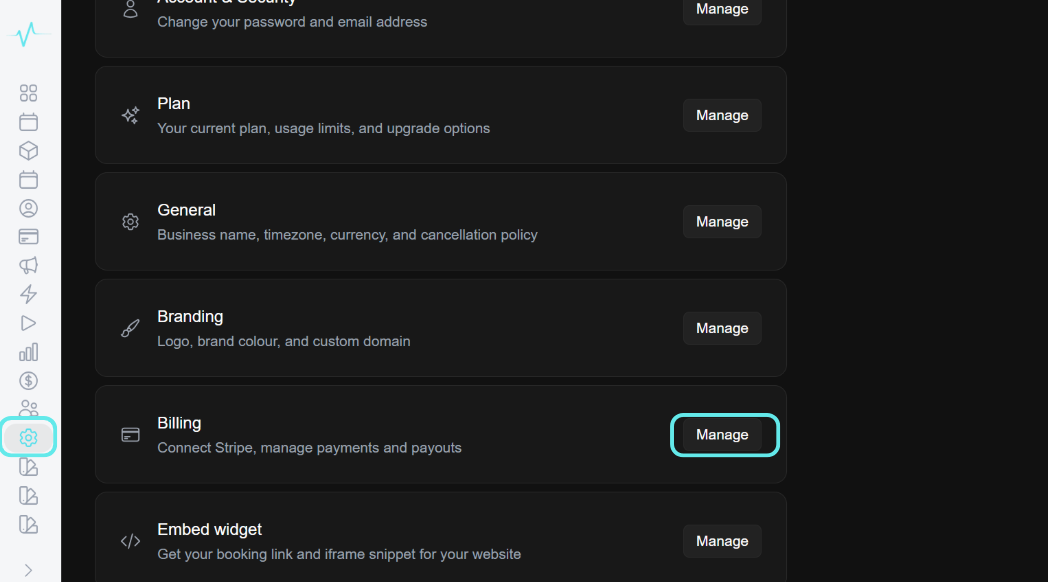
Go to Settings in the left sidebar
Click Manage next to Billing
Click Connect Stripe Account
You will be redirected to Stripe
Sign in to your existing Stripe account or create a new one.
Complete Stripe's onboarding
Enter your business details, bank account, and verify your identity.
Once complete, Stripe will redirect you back to Vastali
Your Stripe account status will show as Connected
Tip: If your Stripe account is still in restricted mode (pending verification), payments will be held by Stripe until verification is complete. Check your Stripe dashboard for any outstanding requirements.
More in Getting Started
Ready to get started?
14-day free trial. No credit card required.